Why Do Silicone Keypads on Automotive Battery Testers Need Anti-Mispress Design?
- Share
- publisher
- FromRubber
- Issue Time
- Nov 16,2026
Summary
Accidental key presses on an automotive battery tester come from three different causes, and each needs a different design answer. This article separates geometric, postural and confirmation mispresses and shows what silicone geometry can and cannot fix.
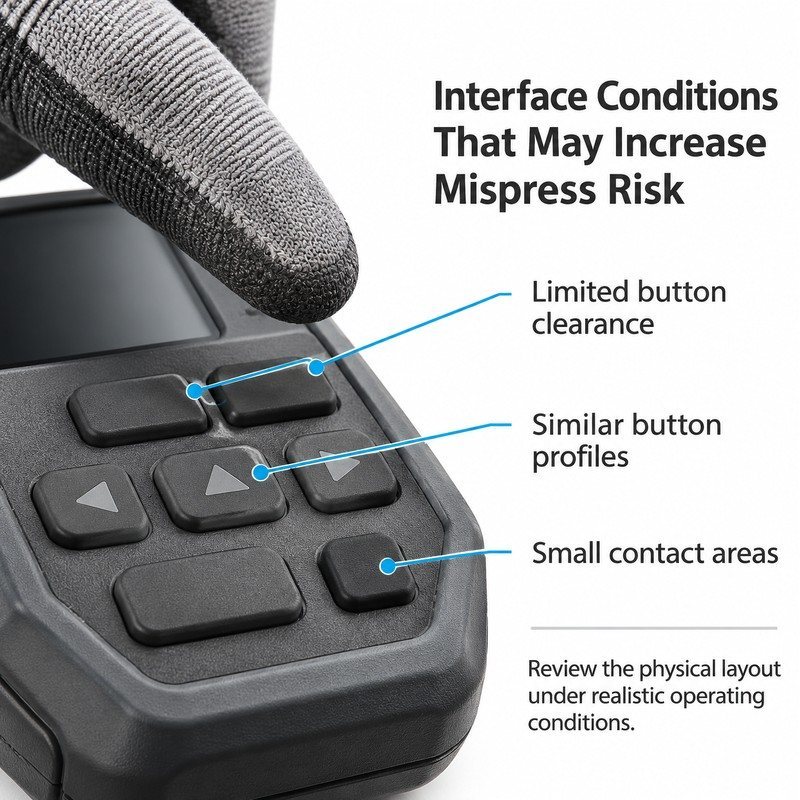
A battery tester is used in an awkward posture. The instrument is often held in one hand while the other hand connects a clamp, the technician is leaning over a wing or crouching beside a wheel arch, and the panel is pressed with a thumb without a clear line of sight. In that position, a key that is easy to press is not automatically a good key.
When a reading changes unexpectedly, the first suspicion usually falls on the electronics or the firmware. Sometimes that is right. Often it is not: the keypad recorded a press that the operator did not intend, because the geometry allowed a thumb, a knuckle or a gloved palm edge to reach a neighbouring key.
Anti-mispress design is the work of making unintended presses less likely without making intended presses harder. It is a combination of spacing, profile, separation and tactile confirmation, and it starts with knowing which kind of mispress is actually happening.
In short: separate the three causes before choosing a design response. Geometric mispresses are reduced by spacing and separating channels, postural mispresses by guards, recesses and bezel geometry, and repeated presses by a clear tactile detent. Firmware debounce addresses none of the three geometries.
What Makes Accidental Button Presses More Likely on Automotive Battery Tester Keypads?
Three conditions raise the risk on a handheld workshop instrument: keys that are close together, keys that feel the same, and keys that give no confirmation when they have been pressed. Each produces a different kind of error.
The first is a geometric error: the finger lands on the neighbour. The second is postural: the panel is pressed by whatever part of the hand happens to be resting on it. The third is confirmatory: the operator cannot tell whether the press registered, so they press again and the second press lands somewhere else.
The panel above shows the three conditions together. None of them causes a mispress on its own, but together they remove the margin that a workshop glove needs.
Closely Spaced Buttons Can Make Adjacent Controls Harder to Distinguish
Close spacing narrows the zone in which a press is unambiguous. With a gloved thumb, the contact patch is wide enough to overlap two keys, and the one that closes first is not necessarily the one the operator aimed at. On a tester where one key starts a test and another changes the displayed scale, the consequence is a wrong reading rather than a wrong menu.
Flat Button Surfaces May Provide Less Physical Separation
Similar heights and similar crowns give the finger nothing to compare. Flat keys are the worst case, because the surface is continuous and the only boundary is the edge of a printed legend. A glove cannot read print, so a flat panel is effectively a single large key with several functions.
Small Buttons Can Be Difficult to Press Accurately
Small keys combine two problems: the target is narrow and the surrounding gap is usually small as well, because the panel is fixed. A small key with a generous gap can work; a small key with a tight gap is the configuration most likely to produce adjacent presses.
Similar Button Shapes Can Increase Identification Difficulties
Identical shapes rely entirely on position memory. That works for a trained technician using the same instrument every day and fails for a technician borrowing a colleague's tester, or for anyone using the instrument with a glove in poor light.
How Can Silicone Keypad Geometry Help Reduce Accidental Activation?
Geometry works on the first two error types. It cannot fix a bad debounce setting, and it cannot stop a determined palm, but it can remove the ambiguous zones where a press could belong to either of two keys.
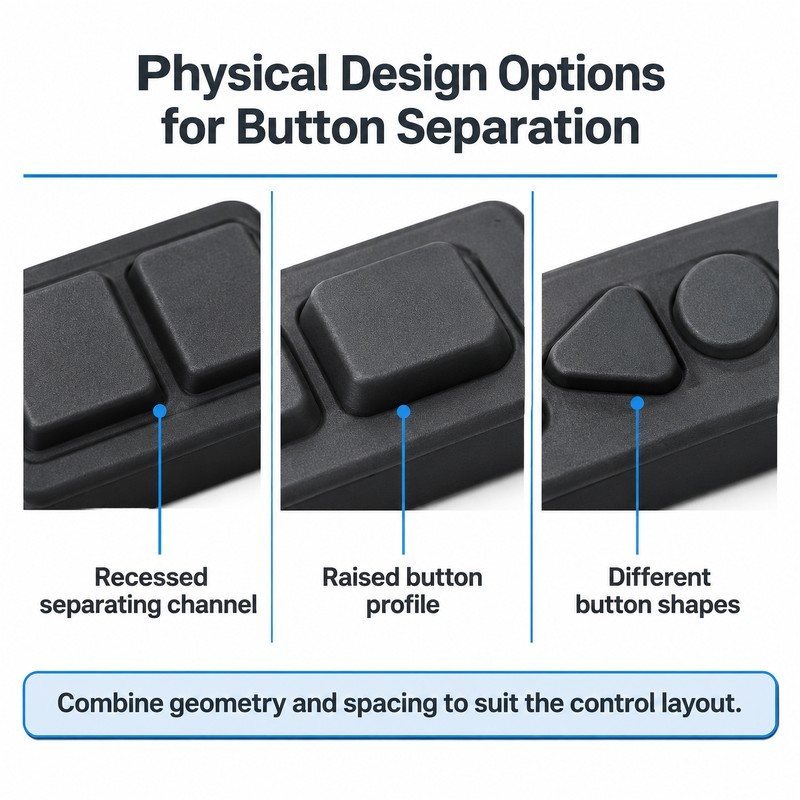
The options above are alternatives, not a checklist to apply everywhere. A recessed channel costs panel area, a raised profile changes force, and a distinct shape only helps if the difference is visible and feelable.
Use Recessed Areas to Separate Adjacent Buttons
A recessed channel between keys creates a physical valley that a thumb can feel and that stops a press from sliding sideways into the neighbour. It is effective on panels where the keys are already close, because it adds separation without adding center distance.
The cost is in cleaning and tooling. A channel collects dust and wipe residue, and a deep narrow channel is harder to mold and harder to vent. A shallow, open channel with a generous radius gives most of the benefit with fewer manufacturing consequences.
Adjust Button Height to Make Important Controls Easier to Identify
Raising the critical keys above their neighbours makes them findable and gives the finger a boundary. On a tester, the start key and the mode key benefit most. The limit is the enclosure: a key that stands above the protective bezel becomes easier to press by accident when the instrument is set down.
Increase Button Spacing Where the Panel Layout Allows
The simplest answer is often the best: move the keys apart. Where the panel allows it, adding a millimeter of edge clearance reduces adjacent presses more reliably than any profile change. The trade-off is the second row, which may have to move or shrink.
Use Different Button Shapes for Controls With Different Functions
Shape differences help the operator confirm a key without looking. A rectangular start key among round keys is recognisable by touch and by peripheral vision, and it removes the need to read a legend under a vehicle.
Why Does Tactile Feedback Matter in Anti-Mispress Keypad Design?
The third error type, the uncertain press, is solved by confirmation rather than separation. If a key gives a clear detent and a clean return, the operator knows the press registered and does not press again. If it feels the same before and after, the natural response is a second, harder press, which is where a thumb often lands on the neighbour.
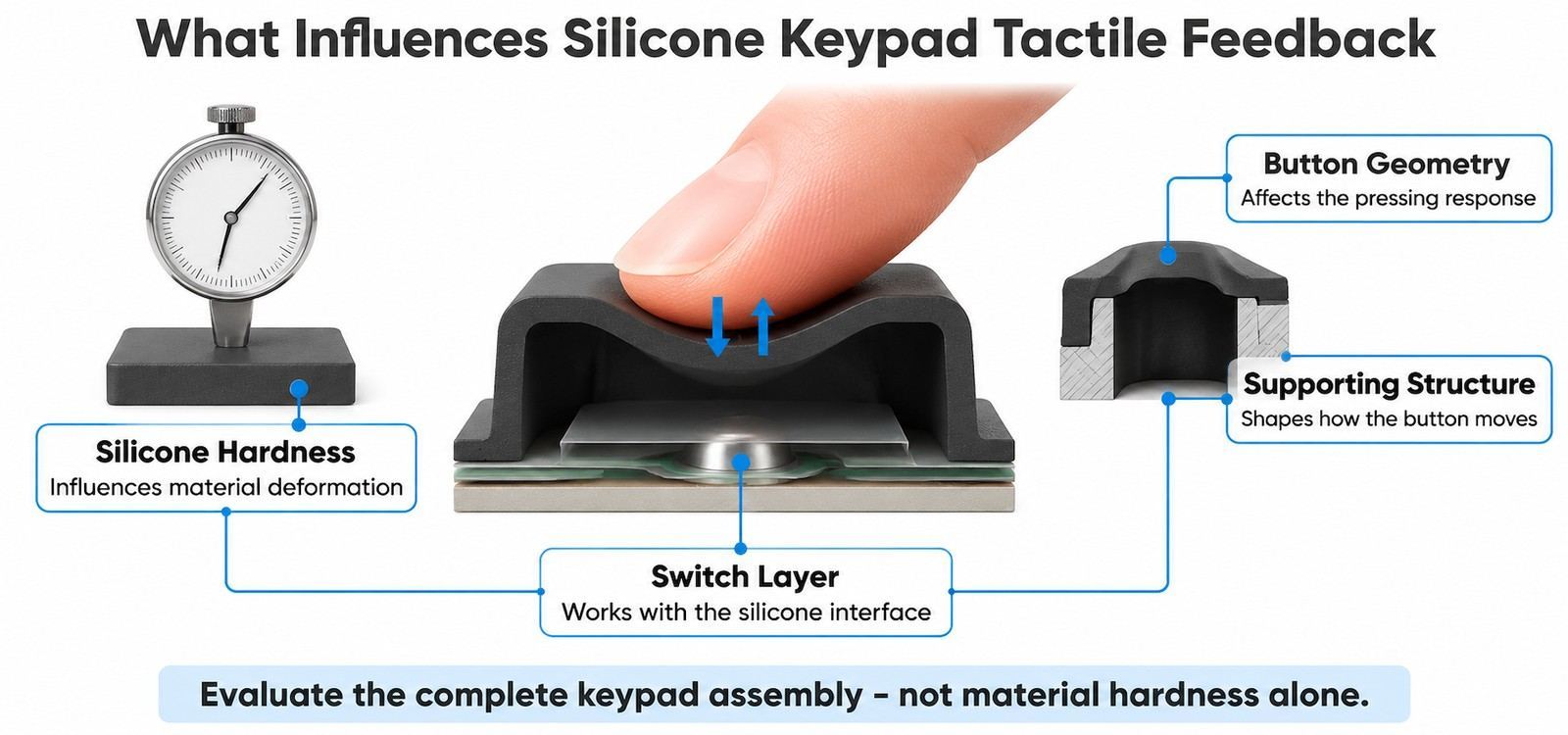
Button Hardness Influences the Pressing Experience
Hardness sets how much the key deforms before the switch closes and how firmly it returns. A soft key absorbs part of the press and can feel spongy; a hard key transmits force quickly and can feel abrupt. On a workshop instrument used with gloves, a slightly firmer key with a defined snap is usually easier to confirm than a soft one.
Button Structure Influences the Force Needed to Activate a Control
The supporting wall and the web decide how much of the thumb force reaches the switch. A short wall with a thin web transfers force directly; a tall wall with a soft web absorbs it. The structure, not the compound alone, is what makes two keys with the same hardness feel different.
Distinct Button Profiles Can Make Different Controls Easier to Recognize
A profile difference at the crown, such as a shallow dish, a small raised dot or a different top radius, is felt immediately and costs very little cavity work. It is the most economical way to give a small panel a tactile map.
Consistent Pressing Feel Matters Across the Complete Keypad
An inconsistent keypad is worse than a uniformly mediocre one, because the operator cannot build a habit. Every key should require a comparable press, even when their functions differ, and the ones that deviate should be deliberate rather than accidental.
Electrical behavior belongs to the switch layer and the circuit, not to the silicone alone. A keypad that closes cleanly can still produce ghost inputs if the switch layer or the firmware debounce is unsuitable, and no amount of silicone geometry will correct that.
| Mispress type | How it happens | Design response | What the response does not fix |
|---|---|---|---|
| Geometric | The finger lands on the neighbouring key | Spacing, separating channel, distinct shapes | Palm or knuckle contact |
| Postural | The hand rests on the panel while the tool is held | Raised guards, recess, bezel height | Aiming accuracy between adjacent keys |
| Confirmatory | No detent is felt, so the operator presses again | Firmer compound, defined snap, consistent return | Switch layer or firmware behavior |
How Should Critical Controls Be Positioned on a Compact Automotive Battery Tester?
Position decides which keys a resting hand touches. On a handheld tester, the natural thumb position sits over the center of the panel, and the heel of the hand rests along one edge. Keys placed there will be pressed more often than the layout drawing suggests.
Separate Frequently Used Controls From Less Common Functions
Start and mode belong under the thumb. Calibration, memory and setup keys belong away from it, ideally at the edge where a deliberate reach is required. The separation is a physical one, not only a visual one.
Give High-Priority Controls Enough Physical Clearance
The keys that start or change a measurement deserve the largest gap around them, because an error there costs a repeat test. Giving those two keys extra clearance is usually more valuable than giving every key equal spacing.
Avoid Placing Similar Controls Too Close Together
Two keys with similar shapes and similar functions should not be adjacent. If they must be, differentiate them physically: height, top shape or a separating channel. Placing a scale key next to a start key with the same profile is an invitation for a wrong reading.
Consider the Actual Operating Environment When Planning the Layout
A tester used in a workshop is pressed with oily gloves, in low light, sometimes with one hand while the other holds a clamp. All three conditions favour larger separation, stronger height differences and legends that survive solvent contact. A layout reviewed only on a desk will miss them.
Which Silicone Keypad Structures Should Be Reviewed During Custom Development?
Anti-mispress design is decided in the same review as the rest of the keypad structure. Four items carry most of the risk.
Check the Relationship Between Button Diameter and Surrounding Recesses
A recess around a key adds separation but reduces the effective top face. If the recess is too wide relative to the key, the operator presses the recess wall instead of the key, and the press feels vague. The two dimensions have to be designed together.
Review the Supporting Structure for Different Button Profiles
Different crowns need different support. A dished key with a thin wall can collapse at the center; a tall key with a narrow base can tilt. When profiles vary across a panel, the structure under each one has to be checked individually rather than copied from the neighbour.
Consider Mold Details Around Recessed and Raised Features
Channels, recesses and raised crowns are all harder to fill and vent than a flat surface. A recess that does not fill leaves a rounded edge instead of a defined wall, and the separation the design relied on disappears. Venting and parting line position belong in the same review.
Confirm Compatibility Between the Silicone Keypad and the Electronic Switch Layer
Button travel has to match the switch. If the silicone web is too stiff, the key may not close the contact reliably; if it is too soft, the key may close before the operator feels a detent. The pairing is confirmed on an assembled sample, with the actual switch layer, not on the silicone alone.
How Can Buyers Evaluate Anti-Mispress Performance Before Mass Production?
Anti-mispress performance is testable without instrumentation. The tests are simple, repeatable and best done with the glove and the posture the product will actually meet.
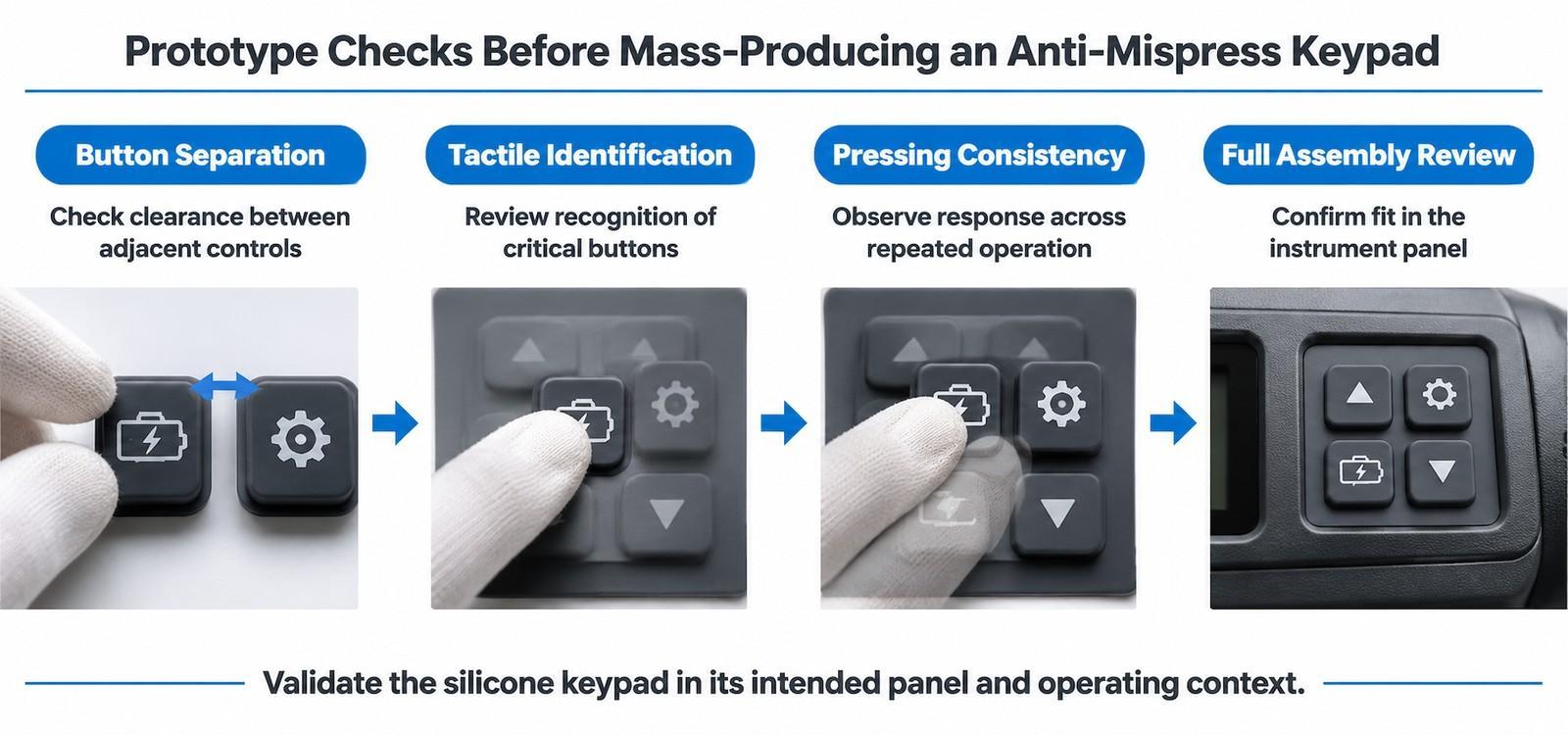
Test Whether Adjacent Buttons Can Be Pressed Independently
Press one key at a time and watch whether the neighbour moves or the switch closes. Then press at the edge of a key, at the corner, and with a slightly angled thumb. Any position that produces a neighbouring response identifies a gap that is too small for the intended use.
Check Whether Users Can Identify Critical Buttons by Touch
Ask someone who has not seen the layout to find the start key without looking. If they need to look, the tactile map is not working, and the panel will be used by sight alone in an environment where sight is not available.
Evaluate Button Response Across Repeated Pressing
Press each key fifty times and check that the feel and return stay consistent. A key that softens, sticks or changes sound is telling you something about wall thickness, web design or assembly pre-load, and that behavior will appear in the field.
Review the Complete Keypad in the Actual Instrument Panel
The final check is the assembled instrument: housing closed, gasket compressed, bezel in place. Recess depth and effective protrusion both change at that point, and so does the clearance between the outer keys and the housing.
Anti-mispress design reduces risk; it does not eliminate it. A layout that passes every prototype check can still be mis-pressed by a determined palm, which is why the firmware debounce and the switch layer remain part of the same conversation.
What Should Buyers Specify When Requesting an Anti-Mispress Silicone Keypad?
- Battery tester model or application, and the conditions it is used in.
- Intended operating method: one hand, two hands, gloved, over an engine bay.
- Number and function of every button, with critical controls identified.
- Which keys need protection against accidental activation, and why.
- Button diameter, height, spacing and edge clearance.
- Raised or recessed profile requirements, including any separating channels.
- Silicone hardness preferences and the required pressing feel.
- Surface texture, color and legend requirements.
- Underlying switch layer and assembly requirements, including travel.
- Panel drawings, CAD files and bezel details.
- Prototype validation plan and production quantities.
Frequently Asked Questions
Can silicone keypad design eliminate accidental presses completely?
No. Geometry can reduce the ambiguous zones that cause geometric and postural mispresses, and tactile feedback reduces repeated presses. The switch layer and the firmware debounce remain part of the system.
Is a recessed channel better than a wider gap between keys?
They solve the same problem at different costs. A channel adds separation without adding panel area but complicates cleaning and molding; a wider gap is simpler and uses space the panel may not have.
How do I know whether a mispress is mechanical or electrical?
Press the panel slowly with the instrument powered and observe the response. If the key closes cleanly and the input still appears twice, the cause is downstream. If adjacent keys respond together, the geometry is involved.
Does a harder silicone reduce accidental activation?
A firmer key is less likely to be closed by a light brush of the palm, but it also changes the pressing feel and the force needed for a deliberate press. The effect is smaller than the effect of spacing and separation.
Should critical keys be raised or recessed?
Raised keys are easier to find and confirm; recessed keys are harder to press by accident. On a handheld tester, a raised critical key inside a shallow recess usually gives both benefits.
What is the first thing to change if users report wrong readings?
Look at the panel layout before the electronics. If the start key and the scale key are adjacent and share a profile, the layout is the most likely cause and the cheapest thing to correct.
Conclusion: Anti-Mispress Performance Starts With the Complete Keypad Interface
Accidental activation is rarely a single-variable problem. It comes from keys that are close, profiles that feel alike, and presses that give no confirmation. Geometry can address the first two, tactile feedback addresses the third, and the switch layer and firmware close the loop.
FromRubber works with automotive testing equipment programs on button geometry, separation features, silicone material selection, mold development and sample evaluation. For an anti-mispress keypad, the review is most useful while the layout can still move, before the cavity fixes the gaps that cause the problem.
Sources and Further Reading
- Tractor control panel silicone buttons: selecting the right tactile force tactile force selection for vehicle-mounted controls.
- Stair climber silicone keypad button travel and tactile response travel and response in handheld equipment keypads.
- Spectrum analyzer keypad sticking and ghost triggers how pad ageing produces unintended inputs.
- Conductive silicone keypad for POS machines with defined tactile feedback reference construction for tactile-feedback keypads.
- ISO 13849-1:2023 addresses safety-related parts of control systems and is relevant where a keypad carries stop, reset or mode-selection functions.
- IEC 60529:1989+AMD1:1999+AMD2:2013 defines the IP code for enclosure protection, which matters where keypad channels and recesses change the sealing path.
Reworking a keypad that mis-presses?
Send the current layout and a note on which keys trigger unexpectedly. FromRubber will review separation, profiles and tactile feedback against the way the tester is actually held.
Send the layout for an anti-mispress review
FromRubber is the export brand of Dongguan Bohao Electronic Technology Co., Ltd., Qiaotou, Dongguan, China. IATF 16949:2016 and ISO 9001:2015 certified.